ImageSharp.Drawing 3.0.0 is out.
ImageSharp.Drawing 3.0.0 includes a .NET 8+ baseline, a stateful DrawingCanvas API, retained scenes, a rewritten CPU renderer, optional WebGPU rendering, PolygonClipper-based clipping and stroking, painted glyph rendering, hatch and sweep brushes, and text APIs built on Fonts 3.
This is a breaking, ground-up rewrite. The old extension-method drawing model has been replaced by a canvas model, and the change reaches drawing entry points, paths, shapes, brushes, layers, clipping, text, regions, and backend selection.
ImageSharp.Drawing is the composition layer of the Six Labors suite. ImageSharp provides the pixel types and image-processing pipeline, Fonts provides text shaping and metrics, and Drawing provides paths, brushes, clipping, layers, glyph rendering, image processors inside regions, and backend replay.
The release targets applications that need generated or frequently redrawn 2D graphics: charting, diagrams, maps, reports, image generation, overlays, previews, editors, dashboards, and export pipelines.
V3 is also the first ImageSharp.Drawing release to enforce a build-time license key for direct package dependencies. More on that below.
The library now targets the current suite stack:
- .NET 8+
- ImageSharp 4
- Fonts 3
- PolygonClipper
What's new since V2 #
The main changes are:
- A new canvas-first drawing model built around
DrawingCanvasandPaint(...) - A deferred command timeline with
CreateScene()/RenderScene(...)for retained, replayable backend scenes - A rewritten CPU backend organized around a row-oriented retained execution plan
- A new
SixLabors.ImageSharp.Drawing.WebGPUpackage for GPU-backed windows, render targets, and external surfaces - Geometry using PolygonClipper for clipping and stroking
- Painted glyph rendering, glyph drawing, and a single-pass
MeasureText(...)API returning aTextMetricsvalue - The new
SweepGradientBrush, hatch pattern brushes, and reworked handling for solid, pattern, image, linear, radial, elliptic, path, and recolor brushes RoundedRectanglePolygonplusPathBuilder.AddRoundedRectangle(...)helpers- SVG path parser hardening for malformed arc flags, incomplete operand groups, non-finite values, and truncated commands
- Image processing operations constrained to clip bounds when using clipped processors
- API changes for shapes, paths, transforms, layers, and regions
A canvas-first API #
The central API change in V3 is the move to a canvas model.
Previous versions exposed drawing as ImageSharp processing extension methods. That model did not have a place for canvas state, layers, clipping, drawing regions, backend selection, or GPU-native targets.
V3 introduces DrawingCanvas and the Paint(...) entry point. The pixel-typed implementation lives underneath as an internal detail, so callers work against one canvas-facing surface across CPU and GPU targets.
The API is built around explicit canvas state, ordered commands, layers, clips, regions, and backend-neutral scene replay.
using SixLabors.Fonts;
using SixLabors.ImageSharp;
using SixLabors.ImageSharp.Drawing;
using SixLabors.ImageSharp.Drawing.Processing;
using SixLabors.ImageSharp.PixelFormats;
using Color = SixLabors.ImageSharp.Color;

using Image<Rgba32> image = new(1200, 630);
Font font = SystemFonts.CreateFont("Arial", 72);

image.Mutate(x => x.Paint(canvas =>
{
    canvas.Fill(Brushes.Solid(Color.FromRgb(18, 24, 38)));

    canvas.SaveLayer(new GraphicsOptions { BlendPercentage = 0.85F });
    canvas.Fill(Brushes.Solid(Color.CornflowerBlue), new EllipsePolygon(900, 120, 220, 220));
    canvas.Restore();

    canvas.Draw(Pens.Solid(Color.HotPink, 14F), new StarPolygon(new PointF(280, 315), 5, 90, 190, 0));
    canvas.DrawText(
        new RichTextOptions(font) { Origin = new PointF(80, 110) },
        "ImageSharp.Drawing 3",
        Brushes.Solid(Color.White),
        pen: null);
}));
The canvas API includes:
Save()/Restore()/RestoreTo(saveCount)for state managementSaveLayer(...)for isolated compositing, with optional boundsCreateRegion(...)for sub-canvas workflows that share the parent targetDrawImage(...)as part of the same canvas systemApply(path, ...)to run any ImageSharp processor, fromGaussianBlurtoPixelatetoBrightness, inside a canvas regionCreateScene()andRenderScene(scene)to capture and replay prepared draw work as a retained backend scene
Underneath, the canvas records draw calls into a deferred timeline. State changes, layer markers, apply barriers, flush boundaries, and inserted retained scenes all sit on that timeline in submission order. The target is written when the canvas is disposed, or when the surrounding Paint(...) block completes. That lets the same public API drive CPU rendering, GPU dispatch, sub-region drawing, and replay of pre-built scenes.
One timeline, one scene contract, multiple backends #
The canvas API is the point where commands, state, scenes, and backends meet.
DrawingCanvas records drawing intent into a timeline. Raw calls are accumulated, then prepared into a DrawingCommandBatch: source paths get transformed into final geometry, strokes are expanded to fill paths, clip paths are baked in, and dashed strokes are materialized. Every backend receives the same prepared batch.
From there, the contract is small. Backends implement three methods on IDrawingBackend: CreateScene(...) turns a prepared command batch into a retained DrawingBackendScene, RenderScene<TPixel>(...) writes a scene into a typed target frame, and ReadRegion<TPixel>(...) copies a region back for apply barriers. One command batch produces one backend scene. Scene creation is untyped and target-free; only render and readback bind to a concrete TPixel.
That contract supports different execution strategies:
- CPU rasterization into an
Image<TPixel>throughDefaultDrawingBackend - drawing into a sub-region of another frame through
canvas.CreateRegion(...) - drawing into a GPU-native surface through
WebGPUDrawingBackend - future backends that prefer semantic geometry over direct pixel writes
By concentrating preparation in one place and keeping the scene contract small, ImageSharp.Drawing keeps one public programming model while allowing different backend execution models.
Retained scenes are first class #
Any prepared draw work can become a reusable DrawingBackendScene. Build one with canvas.CreateScene(), hold onto it, then drop it into a later canvas timeline with canvas.RenderScene(scene). The retained scene skips command preparation on every replay and dispatches straight into the backend.
Retained scenes support workloads the old extension API could not express directly:
- map and chart panning, where the basemap is rebuilt rarely and redrawn often
- scrolling text and decorations whose geometry is shaped once
- editor previews and overlays where most of the scene is stable from frame to frame
- WebGPU presents where every frame should reuse the same GPU encoded payload
Both backends honor the contract. DefaultDrawingBackendScene carries a CPU execution plan with retained row planning, prepared geometry, and reusable scratch sizes. WebGPUDrawingBackendScene carries an encoded GPU scene plus reusable scheduling and resource arenas, so subsequent renders skip both preparation and arena allocation. The same RenderScene(scene) call on the canvas works for either.
A rewritten CPU renderer #
V3 ships a new CPU rendering core.
The backend executes rows, not commands. One prepared command batch is filtered to visible work, each path is asked for its scale-baked LinearGeometry once (cached on the IPath), row membership is built while preserving submission order, and per-row execution items are materialized up front. From that point the row pass runs in parallel with reusable worker-local scratch, and the rasterizer scan-converts into coverage only where needed. The hot loop never re-walks raw contours.
Responsibilities split the same way: the rasterizer decides coverage, BrushRenderer<TPixel> decides color, and the row handler binds the two and writes destination pixels. Brush renderers are memoized once per visible item before the row pass starts, so brush state never travels with mutable scratch through parallel workers.
The rasterizer at the core was originally inspired by Blaze. V3 adds retained scene execution, inlined stroking, and prepared geometry flowing through batching, layering, and row-local raster work. That reduces hot-path geometry rediscovery, improves locality when writing destination pixels, and preserves draw order inside parallel execution.
The old system exposed AntialiasSubpixelDepth with a default of 16 subpixel steps per pixel. V3 moves to a fixed-point area-and-cover rasterizer with 24.8 precision and 256 subpixel steps. AntialiasSubpixelDepth is replaced by AntialiasThreshold, which controls the coverage cutoff used when aliased output is derived from the coverage model.
That architecture feeds directly into compositing-heavy layouts, repeated text and glyph rendering, complex fills and gradients, layered graphics, and path-heavy scenes such as maps.
Performance #
The FillParis benchmark is a 1096x1060 streetmap of Paris containing 50K fill paths. Numbers below are from BenchmarkDotNet on our test machine (Windows, .NET 8, x64) running the same scene against each backend:
| Method | Mean | Ratio |
|---|---|---|
| SkiaSharp (baseline) | 103.165 ms | 1.00 |
| System.Drawing | 143.026 ms | 1.39 |
| ImageSharp CPU | 48.544 ms | 0.47 |
| ImageSharp CPU, retained scene | 17.879 ms | 0.17 |
| ImageSharp WebGPU | 24.841 ms | 0.24 |
| ImageSharp WebGPU, retained scene | 5.476 ms | 0.05 |
Absolute numbers will move on different CPUs, GPUs, drivers, and runtimes. On this workload, the CPU backend is roughly 2.1x faster than SkiaSharp and 2.9x faster than System.Drawing, the retained CPU path reaches 5.8x, and the retained WebGPU path lands at ~19x faster than SkiaSharp and ~26x faster than System.Drawing.
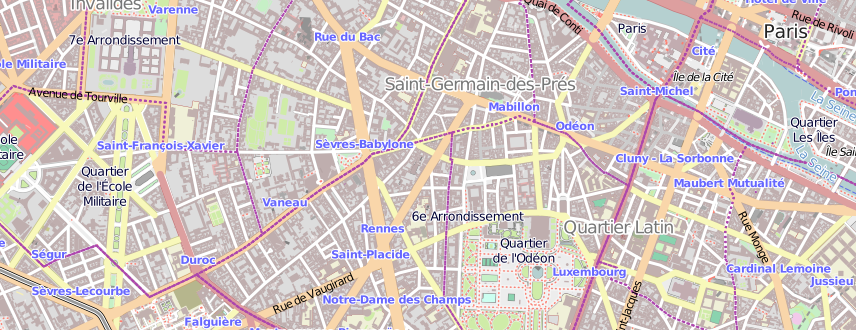
A cropped section of the FillParis benchmark output. The full scene fills 50K paths across a detailed streetmap of Paris with color, layering, and geometric density throughout.
Those results come from a path-heavy scene with dense layering and geometric detail.
The measured difference comes from how the new pipeline scales, not from a single micro-optimization.
In V2, each draw call was an independent image processor. Each one rasterized, composited, and tore down in isolation, and per-call state had to be passed through each invocation. Fifty thousand fills meant fifty thousand setup costs. V3 queues commands on the canvas, prepares them once into a DrawingCommandBatch, and flushes them through a shared scene model. The CPU rasterizer is a tiled fixed-point scanline that integrates area and coverage analytically per cell rather than sampling discrete subpixel rows.
The retained-scene rows show the effect of reusing prepared work. The non-retained CPU path still rebuilds the row execution plan for each render; the retained CPU path reuses it and skips planning entirely. The WebGPU path goes further: the encoded GPU scene, scheduling arenas, and resource arenas are all reused across renders. That is what produces the 5.8x and 18.8x rows.
Compositing also uses new ImageSharp APIs.
The newer PixelBlender<TPixel> APIs in ImageSharp allow bulk row composition to reuse caller-provided working buffers, and they add constant-color blend paths. Porter-Duff blend modes are vectorized up to Vector512<float>, with dispatch widening from Vector4 to Vector256<float> to Vector512<float> based on CPU support. Drawing V3 uses those APIs during brush application and layer composition. The CPU backend keeps worker-local scratch alive for the duration of row execution instead of renting temporary vector buffers for each blend. Solid brushes can blend a single source color directly without first materializing a full overlay row.
Brush rendering shares no mutable scratch through the parallel pipeline. The backend memoizes brush renderers up front, then each worker executes them with its own BrushWorkspace<TPixel> and raster scratch. The hot path avoids per-row buffer churn and thread contention around brush state.
The performance changes come from:
- batching commands instead of rasterizing every call in isolation
- preparing and retaining geometry once instead of rediscovering it in the hot path
- inlining stroking and transforms into the rendering pipeline so they are part of rasterization rather than an expensive pre-pass
- reusing worker-local blend scratch and bulk pixel blending paths so composition avoids repeated temporary-buffer costs
- keeping brush renderers reusable under parallel execution with per-worker state instead of shared mutable scratch
- adding a staged WebGPU path for native targets and heavy scenes
- exposing retained scenes so callers can amortize preparation cost across many redraws
WebGPU #
V3 also introduces a new package: SixLabors.ImageSharp.Drawing.WebGPU.
The new WebGPU backend renders ImageSharp.Drawing content into GPU-native targets through the same canvas model. The public surface starts from the target being rendered into:
WebGPUWindowfor native windows that ImageSharp.Drawing owns and drives the render loop onWebGPURenderTargetfor offscreen GPU-backed rendering and readback into anImage<TPixel>WebGPUExternalSurfacefor attaching to a native window or surface owned by a host UI framework, withWebGPUSurfaceHostfactories for Win32, X11, Wayland, Cocoa, UIKit, Android, GLFW, SDL, and other native targetsWebGPUEnvironmentfor explicit support probes (ProbeAvailability(),ProbeComputePipelineSupport()) and uncaptured-error reporting before any of the targets are constructed
Under the hood, the staged GPU rasterizer is based on ideas and implementation techniques from Vello. The ImageSharp.Drawing implementation adds dynamic scratch-memory growth, chunked oversized-scene execution to keep large flushes within binding limits, and inlined stroking so stroke-heavy scenes skip a separate preprocessing pipeline. Explicit canvas layers stay in the shared composition stream until the scene encoder lowers them into BeginClip/EndClip records that the fine shader interprets directly, so layers do not need a second composition subsystem.
Editors, diagramming tools, map and chart viewers, dashboards, creative tools, live previews, and other composition-heavy desktop experiences can target GPU-native windows and surfaces through the same DrawingCanvas model used for offline rendering. Pair any of the WebGPU targets with canvas.CreateScene() and the encoded GPU scene is reused on each present, with retained scratch and arena allocations carried across renders.
A minimal WebGPU window looks like this:
using SixLabors.ImageSharp;
using SixLabors.ImageSharp.Drawing;
using SixLabors.ImageSharp.Drawing.Processing;
using SixLabors.ImageSharp.Drawing.Processing.Backends;
using Color = SixLabors.ImageSharp.Color;

using WebGPUWindow window = new(new WebGPUWindowOptions
{
    Title = "ImageSharp.Drawing WebGPU Demo",
    Size = new Size(800, 600),
    Format = WebGPUTextureFormat.Bgra8Unorm,
    PresentMode = WebGPUPresentMode.Fifo,
});

window.Run(canvas =>
{
    canvas.Fill(Brushes.Solid(Color.Black));
    canvas.Fill(Brushes.Solid(Color.CornflowerBlue), new EllipsePolygon(200, 150, 80));
});
For offline rendering, WebGPURenderTarget exposes the same canvas through target.CreateCanvas() and supports readback into an Image<TPixel>. For host-owned UI surfaces, WebGPUExternalSurface attaches the backend to an existing native handle and lets the host application drive the frame loop.
Geometry, brushes, and layers #
V3 changes geometry, brush, and layer handling.
The library uses SixLabors.PolygonClipper for clipping and stroke generation:
- boolean clipping (intersection, union, difference, xor)
- outline generation
- dashed strokes
- configurable joins and caps
- clipping against other paths
- handling self-intersecting or degenerate input more robustly
This shows up in the public API:
- explicit
BooleanOperationonShapeOptionsandIPath.Clip(...) IPath.GenerateOutline(...)extensions for producing stroked geometry, with optional dash patternsStrokeOptionsexposingLineJoin,LineCap,MiterLimit, andArcDetailScaleIntersectionRulecontrolling fill rule semantics
The rewrite also updates the core shape surface, including Path, PathCollection, Polygon, ComplexPolygon, RectanglePolygon, RoundedRectanglePolygon, RegularPolygon, StarPolygon, PiePolygon, EllipsePolygon, ArcLineSegment, CubicBezierLineSegment, and LinearLineSegment. Paths also expose a cached LinearGeometry per scale, so the CPU rasterizer does not re-flatten curves for the same path on repeated renders.
Brush handling has been reworked across SolidBrush, PatternBrush, hatch pattern brushes, ImageBrush<TPixel>, LinearGradientBrush, RadialGradientBrush, EllipticGradientBrush, PathGradientBrush, and RecolorBrush. The new SweepGradientBrush supports sweep gradients needed by painted glyphs. Brush intent is carried through canvas preparation, batching, and parallel execution without sharing mutable scratch.
SaveLayer(...) provides isolated compositing with optional bounds in local coordinates. On the CPU backend layer boundaries become temporary backing buffers during scene execution; on the WebGPU backend they become inline BeginClip/EndClip records the fine shader handles directly.
Clipped image processing is also constrained to the clip bounds, so operations run through Apply(...) affect only pixels inside the clipped region.
Text rendering #
Fonts is ImageSharp.Drawing's text engine. V3 gives the canvas text APIs built on the Fonts 3 rewrite.
The canvas exposes three text primitives:
DrawText(...)for rich text renderingDrawGlyphs(...)for already-shaped glyph geometryMeasureText(...)returning aTextMetricsvalue with logical advance, ink bounds, renderable bounds, normalized size, per-character entries, and per-line metrics from a single shaping pass
DrawText(...) pairs rich text layout through RichTextOptions with rendering of monochrome glyphs and painted glyph formats such as COLRv1, SVG, and emoji. Layer compositing follows the font's paint ordering, so color fonts render through the same canvas API used for plain text.
MeasureText(...) uses the same shaping and layout path as rendering. It returns the logical layout metrics, rendered ink bounds, per-character measurements, per-line metrics, hit-testing data, caret positions, and selection bounds needed by editor-style interactions.
For text that needs to be measured, wrapped, or drawn repeatedly, Drawing can use the Fonts 3 TextBlock APIs. TextBlock shapes text once and can produce line layouts at different widths, which is what you need for rich text editors, multi-column layout, and samples where text flows around shapes or custom regions.
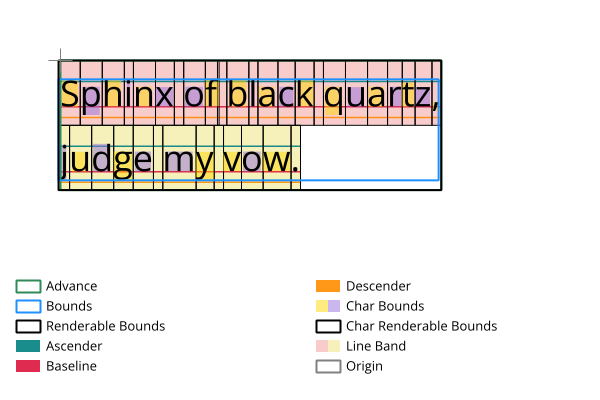
ImageSharp.Drawing V3 exposes both logical layout metrics and rendered ink bounds, down to per-character measurements.
For scenarios where you already have shaped glyph geometry and want a flat monochrome render, DrawGlyphs(...) is a cheaper alternative. It takes a single brush and pen, and uses a coverage heuristic to keep one dominant background-like layer as outline-only so layered glyphs like emoji still read sensibly.
Migration #
Treat V3 as a migration, not a point upgrade.
The changes to plan for are:
- V3 targets .NET 8+
- the canvas API replaces the older extension-heavy drawing model
- the package stack moves forward with ImageSharp 4, Fonts 3, and PolygonClipper
- shapes, paths, brushes, layers, and related APIs have been renamed or relocated to fit the new model
The public surface now centers on the canvas model.
V3 is also the first ImageSharp.Drawing release to enforce a build-time license key for direct package dependencies. If you are taking a direct package dependency on ImageSharp.Drawing in a commercial setting, make sure you review that change as part of your upgrade.
If you are upgrading from V2, plan for source changes across the drawing API rather than isolated call-site fixes.
Closing #
ImageSharp.Drawing 3 moves the library to .NET 8+, replaces the extension-heavy API with DrawingCanvas, adds retained scenes, rewrites CPU rendering, adds WebGPU targets, moves clipping and stroking onto PolygonClipper, adds hatch and sweep brushes, supports painted glyph rendering, and updates text measurement APIs.
Explore the docs, try the new APIs, and let us know what you build with it.
ImageSharp.Drawing V3.0.0 is licensed under the Six Labors Split License. This means that it is free to use in both non-commercial and certain commercial applications. However, if you are using it in a commercial application and your organization has annual gross revenue exceeding 1M USD per year, you must purchase a commercial license. Please see the Pricing page for more information.
- Next: Announcing ImageSharp.Web 4.0.0
- Previous: Announcing ImageSharp 4.0.0